 SnagBane
Your data stays where it belongs.
A summary for IT and security reviewers: how SnagBane is deployed, how it controls access, how it is hardened and exactly what leaves your server.
Deployment and data
- Self-hosted. SnagBane is software you install with Docker, on a VPS or on cPanel. Forms, answers, files and accounts are stored in your own database (MySQL/MariaDB, PostgreSQL or SQLite) and your own storage.
- No shared default passwords. The Docker database starts with a setup password that the installer replaces with a strong random one;
php artisan snagbane:db-passwordchanges it later. - Private file storage outside the web root, with random file names.
- Works on an internal network. The Free plan needs no internet access; Business and Enterprise need outgoing HTTPS for the licence check.
Identity and access
- Single sign-on with Microsoft Entra ID, Google Workspace, Okta and any SAML 2.0 identity provider such as AD FS or Ping (Business and Enterprise) — only signed SAML responses to sign-ins SnagBane started, each accepted once. Directory sign-ins never create administrators, and group-based role mapping only ever raises a role.
- Two-step verification for SnagBane accounts: an authenticator app (its setup key can go into a password manager) or FIDO2 security keys and passkeys — YubiKey, Windows Hello, Google Password Manager, iCloud Keychain. The strongest method is asked first; one-time recovery codes are the way back, never the password alone. Can be required for administrators, and an administrator can require someone to set it up again.
- Account lockout after repeated failed sign-ins — also for unknown email addresses, so accounts can’t be discovered — strong password rules and bcrypt hashing.
- Roles and workspaces: owners, admins, editors, viewers and respondents; access rules per form, portal and workspace. Visitors without access see only the title and description, never the questions.
- New people get no edit rights by default — the default role is respondent.
Application security
- Strict Content Security Policy with per-request nonces, clickjacking protection, HSTS on HTTPS, nosniff and a referrer policy. CSRF and session-fixation protection.
- Uploads are checked by extension allow-list and content sniffing; scripts, executables, SVG/HTML and double extensions are blocked.
- SSRF protection for every webhook and integration: private and metadata addresses are blocked (DNS-rebinding safe), with an admin allow-list for trusted internal hosts.
- Secrets encrypted with your application key. API tokens, approval links, edit and resume links are stored only as hashes.
- Server-side validation of every answer, branching path and calculation; quiz answers never reach the browser; spreadsheet formula injection is neutralised in CSV, Excel and Google Sheets exports.
- Links built from your configured address, never from the request’s Host header.
Monitoring and audit
- Audit log of sign-ins, administration, exports and approval decisions, including who changed an approver and why.
- SIEM streaming: every entry is also written as one flat JSON line to a daily file, ready for Microsoft Sentinel, Elastic or a Splunk universal forwarder. Export as CSV or JSON lines.
- Signed webhooks (HMAC-SHA256 with timestamp) so receivers can verify every call.
Updates and supply chain
- Signed updates: every release is verified with Ed25519 before it installs, then applied with maintenance mode and a one-click rollback.
- Clean updates: files removed in a release are removed from your server too, so an updated installation matches a clean install.
- Licence proofs are signed and verified with a key built into the app — no environment switch can unlock a paid plan.
Settings you control
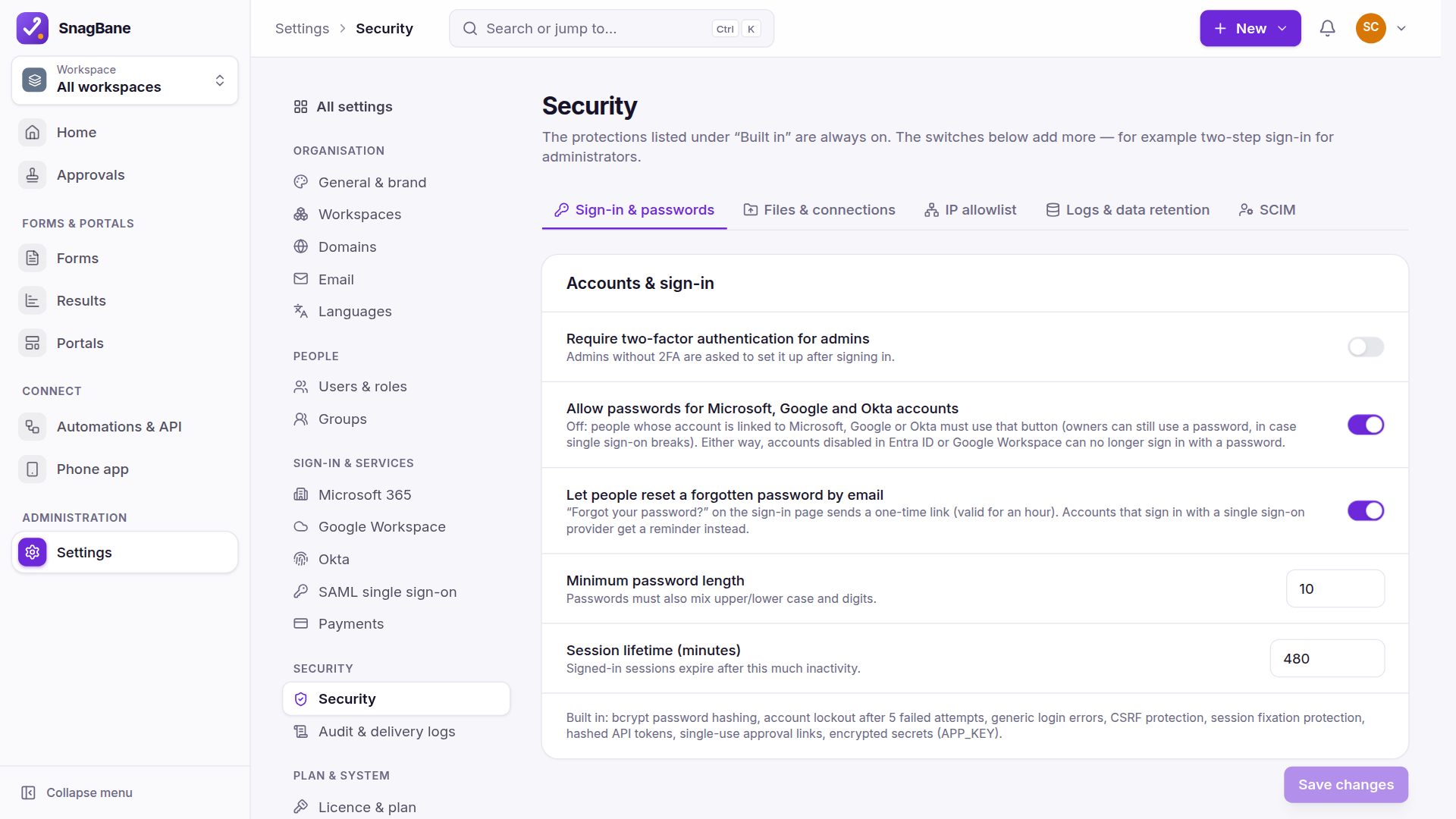
Secure defaults are applied out of the box. In Settings → Security you can tighten them further:
- Require two-factor authentication for administrators
- Minimum password length (upper and lower case and digits are always required) and session lifetime
- Allowed file extensions and maximum upload size
- Allowed private hosts for webhooks and integrations — everything internal is blocked otherwise
- SharePoint, OneDrive and Google Drive locations and accounts editors may use (administrators can choose any)
- Whether Microsoft, Google and Okta accounts may also use a password; accounts disabled in Entra ID or Google Workspace can no longer sign in with one
- Write every response to a JSON log file for your log shipper
- Data retention: delete old responses automatically after the period you choose (see GDPR)
Architecture
One web application on your server — no cloud service of ours in the path of your data.
- Application: PHP 8.3+ (Laravel) behind your web server, or the Docker image. The browser app is served from the same address; no third-party scripts, fonts or CDNs are loaded, and the Content-Security-Policy only allows your own server.
- Database: MySQL/MariaDB, PostgreSQL or SQLite — forms, responses, approvals, accounts and settings. Passwords and API keys of integrations are encrypted with the installation’s own key (
APP_KEY). - Files: uploads, signatures and generated PDFs in the
storagefolder, outside the web root, with random names; they are only served after an access check. - Scheduler: one cron entry (
schedule:runevery minute) sends reminders, applies the retention policy and checks for updates and the licence. - Public addresses: forms (
/f/…), portals (/p/…), approval links (/approve/…) and receipts (/r/…) — each checks its own access rule or signed token. Everything else (/app,/api) needs a signed-in account; the REST API (Business and Enterprise) and SCIM (Enterprise) need tokens. - Backups are yours: the database plus the
storagefolder, includingstorage/.envwith the key that decrypts stored secrets.
What leaves your server
SnagBane has no analytics or telemetry. It makes these connections on its own:
| Connection | What is sent | To | When |
|---|---|---|---|
| Update check | Edition, version, PHP version and site address. With a licence also: the licence key, the Freemius installation ID and a random installation ID | SnagBane update service (Cloudflare) | Daily and when an administrator checks; off with SNAGBANE_UPDATES=false |
| Update download | Only the request for the signed package | SnagBane update service | When an administrator installs an update |
| Licence activation (Business, Enterprise) | The licence key, a random installation ID, site address and name, version, and the name and email of the administrator who activates it | Freemius (our reseller) | Once, when the licence is added |
| Licence check (Business, Enterprise) | The licence key, the Freemius installation ID, the random installation ID and the version | Freemius and the SnagBane licence service | Daily; hourly while a check fails |
And only these when you set them up:
| You switch on | What is sent | To |
|---|---|---|
| Notifications, approval requests and receipts | The mail service you configure (SMTP or API) | |
| Sign-in and directory | Sign-in requests; directory reads for person pickers, managers and groups | Microsoft Entra ID, Google Workspace, Okta or your SAML identity provider |
| Integrations and webhooks | The answers and files each one is set to send | The services you connect, on the events you pick |
| Payments in forms | Amount, currency, what is paid for and the respondent’s email when known — never card details | Stripe or PayPal |
| Audit log to your SIEM | Audit log entries | Your Sentinel, Splunk, Elastic or HTTPS endpoint |
| Machine translation | The form texts you choose to translate | DeepL, Azure, Google or LibreTranslate |
| Phone app notifications | An empty wake-up message — the phone then fetches the notice from your server | The push service of the person’s browser |
| Import a form from a link | A request for that public form page | Google Forms or Microsoft Forms, when an editor imports one |
| Choices from a list | A request for the list | The CSV address, SharePoint list, Excel table or Google Sheet you link |
Documents for reviewers
- Vulnerability disclosure policy — how to report a security problem, and security.txt.
- Data processing addendum — for the personal data you might share with us in support requests.
- GDPR and data protection, privacy policy and the licence agreement.
- The server code ships in readable form with the software, so your team can review and security-test it on your own installation (EULA section 2.3).
We don’t claim certifications such as ISO 27001 or SOC 2: SnagBane runs inside your infrastructure, under your controls and audits.
Reviewer questions
Can we run it without internet access?
On the Free plan, yes — nothing is required. Business and Enterprise need outgoing HTTPS to renew the licence proof at least every 2 days; forms, responses and approvals keep working even while paid features are paused.
Who can see responses?
Only people you give access to the form’s workspace, plus approvers for the requests assigned to them. Approvers open files through their approval, never through a public link.
How are Microsoft 365 permissions set up?
In your own tenant: the recommended PowerShell script creates the app registration there, so you see and control every permission. See permissions.
How do we get the audit log into Sentinel or Splunk?
With the Enterprise plan SnagBane sends it straight to Microsoft Sentinel, Splunk, Elastic or any HTTPS endpoint. You can also point a collector at the daily JSON-lines files in storage/logs/audit. See the SIEM guide.
How do we report a security problem?
Email us as described in the vulnerability disclosure policy. Please don’t open a public issue first.
Where are backups?
Wherever you back up your server: the database and the storage folder. SnagBane doesn’t keep copies anywhere else.