SnagBane
's form builder has 30 question types. Every one of them is available on every plan, including Free. Below is what each type does and where companies typically use it.
Text and contact details
| Type | What it collects | Typical use |
|---|---|---|
| Short answer | One line of text, with optional length limits and patterns | Name, cost centre, order number |
| Long answer | Several lines of text | Justification, description of a problem |
| A checked email address | Contact address, external participant | |
| Phone | A phone number | Callback requests, emergency contact |
| Website | A web address | Supplier website, link to a document |
| Address | Street, second line, postcode, city, region and country (from a list) | Delivery address, new supplier set-up |
Numbers and money
| Type | What it collects | Typical use |
|---|---|---|
| Number | A number, with minimum and maximum | Quantity, number of days |
| Amount | Money in a currency you choose, with the right decimals for it | Expense total, budget, purchase value |
| Slider | A number on a slider with your own step and unit | Hours per week, percentage |
| Calculation | A value worked out from other answers | Total = quantity × price, days off, scores |
Numbers and amounts stay real numbers everywhere: in summaries, exports, SharePoint and Excel columns. That is what lets an approval stage say only when the total is over 500.
Choices
| Type | What it collects | Typical use |
|---|---|---|
| Single choice | One option from a list | Type of leave, priority |
| Multiple choice | Several options | Equipment needed, affected systems |
| Dropdown | One option from a long list | Department, country, cost centre |
| Yes / No | A yes or no | Is this urgent? Is it in the budget? |
| Ranking | Options in order of preference (all, or the top N) | Training topics, event sessions |
Choice questions can also have:
- “Other” with a text box, and options shown in random order.
- Places per option — for example 20 seats per workshop. A full option shows as Full and can't be chosen (the server checks again, so two people can't take the last place); you can also show N places left.
- Dependent lists — the options of one question depend on the answer to an earlier one (country → city, department → team).
- Options from a list — import them from a CSV file or paste them, or keep them linked to a CSV address. On Business, options can also come from a SharePoint list, an Excel table or a Google Sheet and stay in sync.
Ratings and surveys
| Type | What it collects | Typical use |
|---|---|---|
| Star rating | 1 to 5 stars | Event or training feedback |
| Scale / NPS | A number on a scale, e.g. 0–10 with your own end labels | Net Promoter Score, satisfaction |
| Grid (matrix) | One answer per row from the same columns | Rate quality, speed and communication |
| Likert scale | A grid with strongly disagree … strongly agree | Engagement surveys |
Forms can also run as a quiz: correct answers and points per question, the score shown to the respondent right away, and averages and % correct per question in the results. Answer keys never reach the browser. Companies use it for security awareness and safety training.
Dates and times
| Type | What it collects | Typical use |
|---|---|---|
| Date | A day, with earliest and latest allowed dates | Start date, delivery date |
| Time | A time of day | Shift start |
| Date and time | Both in one question | Incident time, appointment |
| Date range | From and to, with the number of days available to calculations | Leave, business trips, room bookings |
People, files and sign-off
| Type | What it collects | Typical use |
|---|---|---|
| Person picker | One or several people, searched while typing | Line manager, deputy, attendees |
| File upload | One or more files, with type and size limits | Receipts, invoices, photos |
| Signature | A drawn signature | Equipment hand-over, acknowledgement |
| Consent | A tick box with your text and link, stored with the server time | Privacy notice, policy acknowledgement |
| Repeating table | Rows with your own columns (text, number, date, choice) | Expense lines, items to order, timesheets |
| Hidden field | A value from the link or a default, not shown to the respondent | Source campaign, location code |
On the Free plan, the person picker searches the people who have an account in SnagBane. With Business it searches your Microsoft 365, Google Workspace or Okta directory and can prefill the respondent's own details — name, email, job title, department and manager.
Layout
- Heading and text block — sections and explanations between questions.
- New section / page — split long forms into pages.
Logic that works with every type
- Conditions — show a question only when earlier answers match (show “Business justification” when the cost is over 500). Hidden questions are never validated or stored, and the rule is checked again on the server.
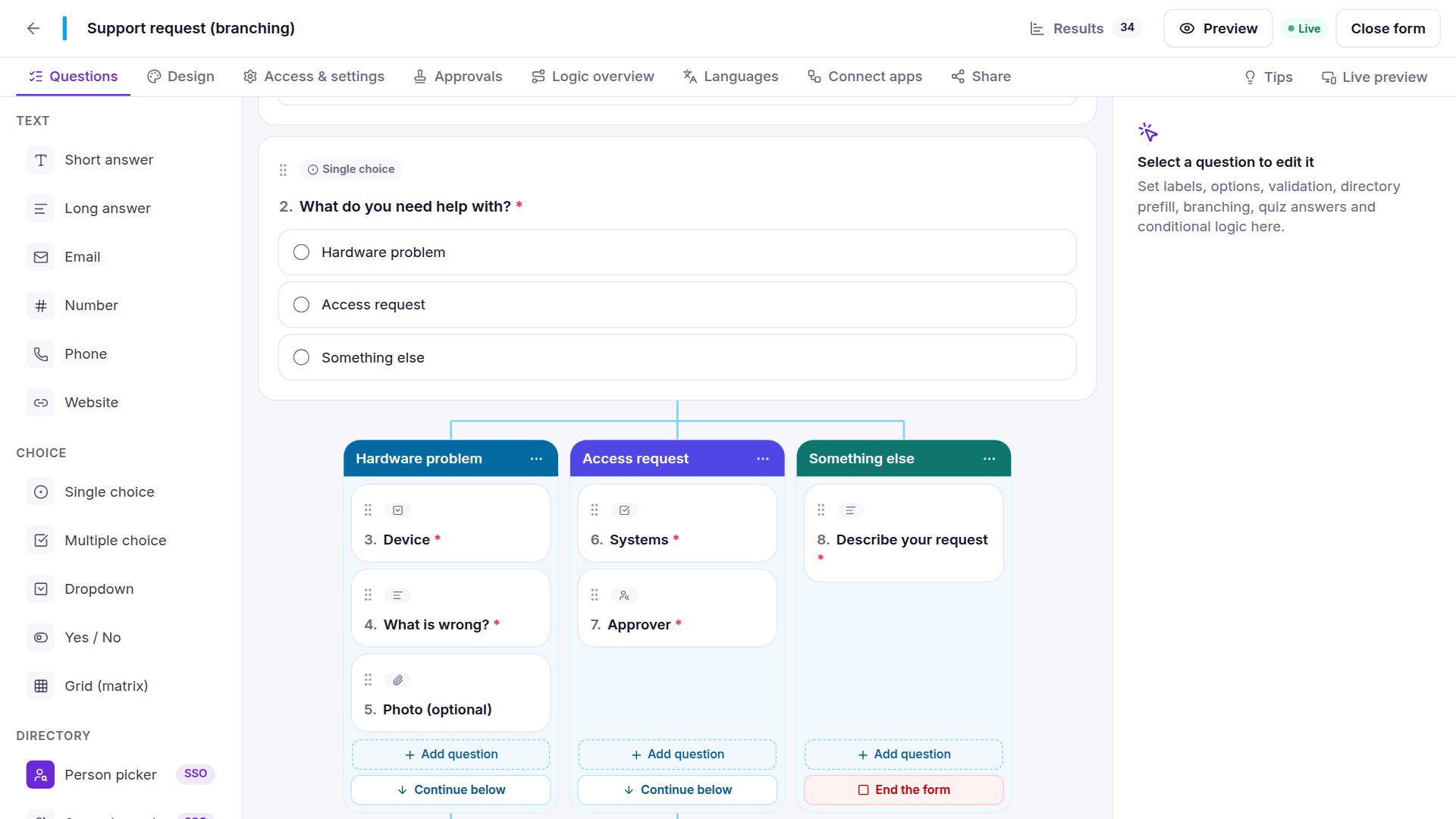
- Branching as columns — give each answer of a choice, dropdown or yes/no question its own questions, side by side, joining again below. You see the whole logic at once.
- Calculations and piping — reuse earlier answers in later questions and in emails.
- Validation — required questions, minimum and maximum values, lengths and date limits, checked in the browser and again on the server.
Getting started
Start from one of the 118 templates, paste your questions from Word, or import a Microsoft Forms, Google Forms or InfoPath form. The documentation describes every option in detail.