SnagBane
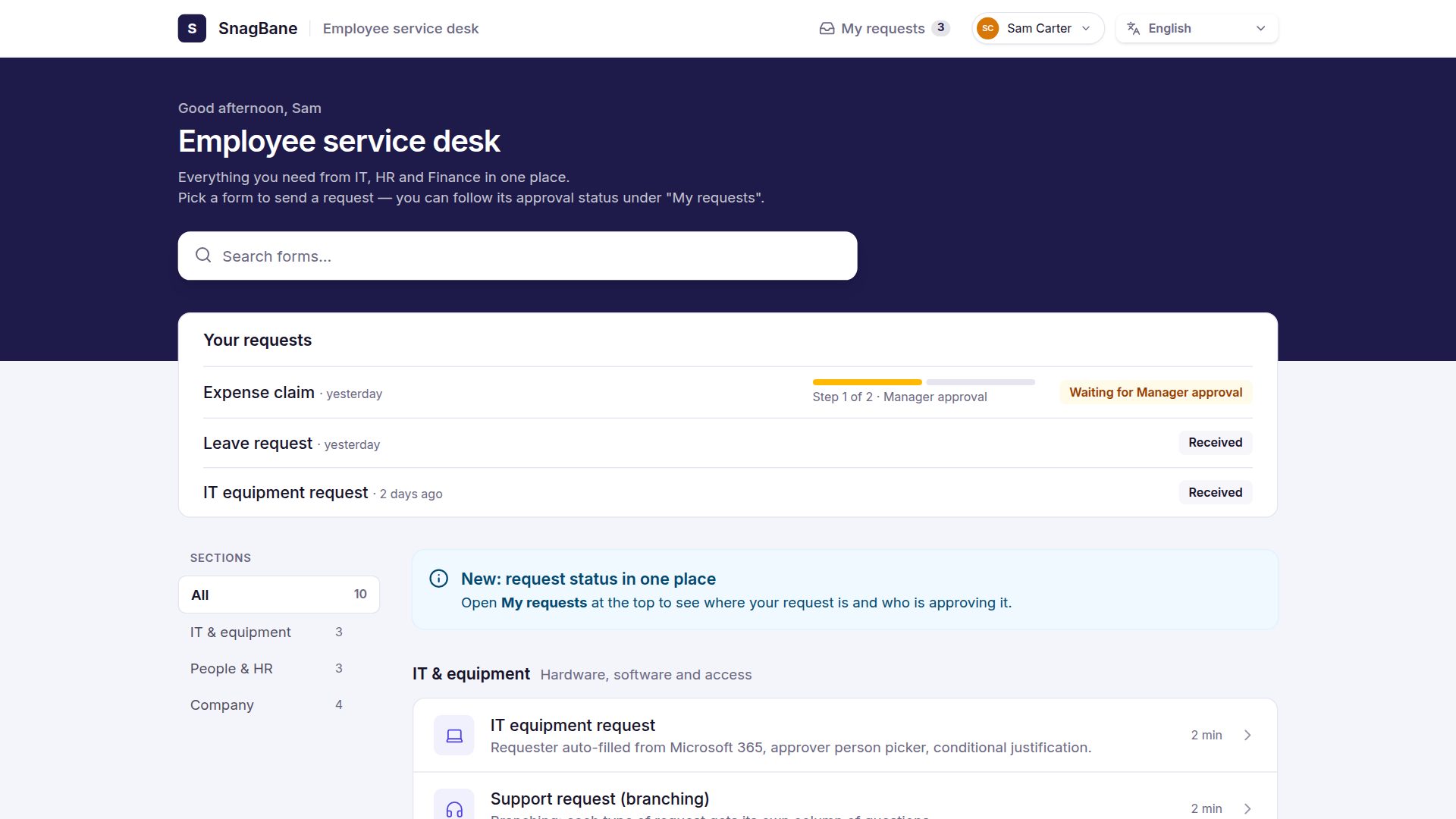
A SnagBane portal is one page where employees find every form and follow every request. Think of an HR or IT service desk: forms grouped by topic, a search box, sign-in, and a My requests tab that shows each approval step. Portals are included on every plan, including Free, and come in 20 looks.
Why companies use a portal
- One link for everything. Instead of forms scattered across intranet pages, emails and chats, people bookmark one address such as
/p/hror/p/it. - No more “any news?”. My requests shows who has approved, who is deciding now and the outcome — the questions that otherwise arrive by email.
- People see only what they may use. Each form keeps its own access rules; forms someone can't open are hidden (or shown greyed out with a sign-in hint, if you prefer).
Creating a portal
- Open Portals → New portal (or New → Portal in the top bar).
- Pick a look from the pictures and tick the forms to include.
- Click Create portal, then arrange the content and press Publish.
In the editor, Content groups forms into categories and adds links (intranet, handbook) and blocks: text, images, buttons, info cards, FAQ, notices, contacts, a call to action and dividers. Each item can get its own title, description, icon, colour or a larger highlighted card. Design sets the look, colours, logo and cover, with a live desktop and phone preview. Access & options decides who can open it — anyone with the link, your organisation, or specific people and groups — and the web address.
The 20 looks
| Look | What it's like | Good for |
|---|---|---|
| Modern | A service desk: greeting, the visitor's latest requests with their steps, services as a list | Company-wide service desks |
| Classic | A colourful banner with forms as cards, a list or tiles | Any team |
| Showcase | A light header with What we cover, large form cards and a Didn't find it? band | A team's home page in Teams |
| Hub | A side menu with the sections, forms as tiles | Many sections |
| Launcher | One big search, every form as an app icon | People who know what they want |
| Magazine | A headline, a featured form, then numbered forms | Campaigns, announcements |
| Directory | One A–Z table with section, time and approvals | Dozens of forms |
| Tabs | One tab per section | Departments with several topics |
| Board | Sections as columns side by side | Process overviews |
| Minimal | Text only: a title and plain lists | Intranets with their own design |
| Bento | Tiles in different sizes and colours | Small, visual portals |
| Split | Title and search on a fixed panel, forms scrolling beside it | Wide screens |
| Guided | Pick a topic first, then its forms | Visitors who are unsure |
| Night | A dark page with glass cards | A distinctive look |
| Checklist | Forms as numbered steps | Onboarding, things done in order |
| Intranet | Cover banner, forms, notices in a side column | A company home page |
| Gallery | Rows of tall colour cards | Events, sign-ups |
| Help centre | A big search and one card per section | Support portals |
| App | A phone home screen with app icons | Mobile-first teams |
| Bold | A poster with one strong colour | Single campaigns |
You can switch the look any time without losing content. Every look has search, sign-in and My requests.
Portals in several languages
Write the portal in one language and add translations for the title, welcome text, categories, links and every block — by hand, with a CSV file for translators, or with DeepL, Azure AI Translator, Google or LibreTranslate. Visitors see the portal in their language; anything not yet translated falls back to the main language. The forms on it use their own translations.
Business: the company portal and Microsoft Teams
- Company portal — one page for the whole company in the Modern look: every workspace becomes a department (IT, HR, Finance…) and its published forms appear by themselves. Visitors can pin their own department.
- Portals as Microsoft Teams apps — the portal gets its own icon in Teams, can be added to any channel or chat, and people are signed in automatically with their Teams account.
Frequently asked questions
Is the request portal included in the Free plan?
Yes. Portals with all 20 looks, sections, blocks, translations and My requests are on every plan. The company portal and portals as Microsoft Teams apps need Business.
Can people outside the company use a portal?
Yes, if you set it to Anyone with the link. Each form on it still follows its own access rules, so internal forms can stay internal.
Can I put a portal on our intranet or SharePoint?
Share its link, put it in a Teams tab or embed it on your intranet page. You can also give SnagBane your own domain, for example forms.yourcompany.com.
See the portals documentation and how approvals show up under My requests.